Wednesday, July 02, 2008
Saturday, June 07, 2008
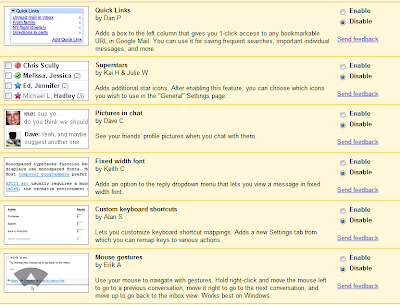
Google Launches Google Mail Labs
Here you can read more about this new feature[eh eh... ]. Basically it adds a new tab in your Gmail Settings page that let's you choose various features that Gmail Team memeber have deveoped[I believe some of them are done using 20% free time they get per week]. I found some of them pretty neat while some of them, are.. well let's say .. not that pretty-neat. But overall it is a nice idea to have your user base to do the beta-testing of upcoming features. Here is a screenshot of the few of the features.
Posted by
Chinmay
at
Saturday, June 07, 2008
1 comments
Thursday, May 15, 2008
CRM SDK 4.0.4 is out...
If you are in CRM 4.0 Development, a must get for you is CRM SDK. You can get the latest version from here : http://www.microsoft.com/downloads/details.aspx?FamilyID=82E632A7-FAF9-41E0-8EC1-A2662AAE9DFB&displaylang=en.
Overview
It contains all new information about creating plug-ins, working with custom workflow activities, using the new Web services, using new data management features, and much more.
This SDK contains information for developers writing server side code, custom business logic, integration modules, workflow assemblies, and more. It provides an architectural overview of Microsoft Dynamics CRM, the entity model, security model, and Web services. Sample code and walkthroughs guide you through the new features.
The SDK also contains information for developers customizing the Web client or Microsoft Dynamics CRM for Microsoft Office Outlook, including scripting, integration of custom Web pages, sample code, and a detailed user interface style guide.
Look for regular updates to this SDK. Future releases will include the ISV Guide and Report Writers Guide.
Posted by
Chinmay
at
Thursday, May 15, 2008
0
comments
Monday, May 12, 2008
ASP.Net Interview Question Links - Part I
Posted by
Chinmay
at
Monday, May 12, 2008
0
comments
Thursday, May 08, 2008
Installing Microsoft Windows XP SP3 Made Easy
I will go step-by-step and will assume you have a clean/Legal XP SP2 Installed. I am very proud as my current installation has not failed in last 1.5+ years. It is not only that XP SP2 is really good in its own ways, there are tricks I've learnt over the years that helps me to keep my OS safe otherwise, my old friends, knows, every 6 months I had to re-install OS no matter which one is taken for example.[Soon you will find a post on that..OS I've installed and my experience with them].
So here it starts, Installing Microsoft Windows XP SP3 Made Easy for everyone... not just for noobs.. :)
Get the stand alone installer to keep the whole game simple. I know it is easy for some people to get SP3 via windows update, I think, from an average Indian's Internet access view point, we better get the stand alone installer.
Google as well as DUMB search engine on Microsoft Download[When I got it, it was ranked 20405 in popularity :P] will not get you this one easily, so here is the direct link.
http://www.microsoft.com/downloads/details.aspx?FamilyID=5b33b5a8-5e76-401f-be08-1e1555d4f3d4&DisplayLang=en
Also maybe in future you can just use the file name or other details mentioned here from the download page.File Name: WindowsXP-KB936929-SP3-x86-ENU.exe Version: 1 1 Knowledge Base (KB) Articles: KB936929 Date Published: 5/6/2008 Language: English Download Size: 316.4 MB
While the file is being downloaded, I suggest you start taking backup of your files, in unfortunate event of update failure, you might just love me that I suggested you to take this step.
Once the file is downloaded, I would suggest it to move it to your fastest disk drive - it can be the SATA drive you have or the portable HDD or anything that has more than 2 GB of free space to keep things fast[My installation started at 01.28 AM and ended at 01.45 AM with 512MB RAM on T2050 @ 1.60GHz]
Close all unnecessary programs and services[stopping services can be a serious problem so as of now if you are not a PRO I would suggest to leave them intact].
Remove all the removable drives, not the one on which you have the SP3 ofcourse. I would suggest to use a clean HDD and system i.e. Anti-Virus and Anti-Spyware check should have been performed. Also remove any bootable disks from optical drives.
Disable the all the Network Adapters and switch off the WLAN if it is on. This is not a mandatory step and it is upto you to follow it or not. However DO NOT forget that you might drop all the protection you have in place in the very next step and you will be vulnerable to any kind of attack... any time.
Shut down your Anti-Virus, Anti-Spyware and Firewall. Yes, I am not drunk this is to not to hinder with SP installation and to improve performance.
If you are using a laptop, please make sure you are plugged in and also have enough backup power in case of power loss. The same goes for PC, a decent UPS will do the trick for the PC users though.
Launch WindowsXP-KB936929-SP3-x86-ENU.exe, if you have downloaded the file from Internet, Windows XP, as a protection measure, might ask you 2-3 times to confirm whether you want to run this file or not. Click on yes without any fear, if something is gonna go wrong..anyways.. it will go wrong.. neither me..nor you can do anything about it.. ) so chill...
It will start extracting the files, most probably to the best drive/volume[In terms of performance].
Once the extraction is complete, follow the On-Screen instructions to start the SP Installation.
It is a pretty simple thing to do though, internally it takes backup of the files to the location which you mentioned at the startup and then updates the system files followed by a system reboot.
Yes, you must reboot the system once you have applied the update.
Start your Anti-Virus, Anti-Spyware and Firewall and then re-attach the removable media as well as enable the network adapters.
And hoorrrray....we are done...
If you face any problem during the setup...you know where you have to look forward to right? aahh..common... not to http://metrix.blogspot.com ... go to Microsoft Support..huh..
Posted by
Chinmay
at
Thursday, May 08, 2008
1 comments
Its time guyz : Getting ready for Interviews
Expecting a lot of input from your side...here I stop...:)
Posted by
Chinmay
at
Thursday, May 08, 2008
0
comments
Labels: Interview
Sunday, May 04, 2008
Bad Bad Bad News...Microsoft withdraws its hostile bid
Posted by
Chinmay
at
Sunday, May 04, 2008
0
comments
Thursday, May 01, 2008
Important Tips against phishing attacks from Official Google Blog
Posted by
Chinmay
at
Thursday, May 01, 2008
0
comments
Labels: Microsoft
Wednesday, April 30, 2008
Bang Bang.. on Google..
Posted by
Chinmay
at
Wednesday, April 30, 2008
0
comments
Monday, April 21, 2008
Yet Another Gmail Bug surfaces
Posted by
Chinmay
at
Monday, April 21, 2008
0
comments
Thursday, April 17, 2008
Blogger's made a poo poo..
Posted by
Chinmay
at
Thursday, April 17, 2008
0
comments
Labels: Microsoft
Google is ready to penetrate deep...The Web..dude..The Web..
Posted by
Chinmay
at
Thursday, April 17, 2008
0
comments
Did gmail made you pull your hair on 16th April?
one of the angry customer said,
"A huge, if not number one selling point for moving one of our companies over to Google Apps was Google's robust network!" complained one user. "Now that we have migrated over, it seems we are abused children who do not deserve an explanation for why the service we pay for is taken offline. Perhaps it is time to find a new e-mail host."
Now this might stop jumping monkey of SalesForce.com?.. hopefully.. as they are the latest clowns in the google apps bandwagon.
Find the whole story : http://www.news.com/8301-10784_3-9920715-7.htm
Posted by
Chinmay
at
Thursday, April 17, 2008
0
comments
Like Gmail? Join the team then...
Posted by
Chinmay
at
Thursday, April 17, 2008
0
comments
Saturday, April 12, 2008
After MacBook Air, Vista Gets Hacked
Posted by
Chinmay
at
Saturday, April 12, 2008
0
comments
Orkut enhances the Search with Auto Complete
Posted by
Chinmay
at
Saturday, April 12, 2008
0
comments
Thursday, April 10, 2008
Microsoft Discloses 14,000 Pages of Coding Secrets
Posted by
Chinmay
at
Thursday, April 10, 2008
0
comments
Google Announces Google App Engine
You can serve your app using a free domain name on the appspot.com domain, or use Google Apps to serve it from your own domain. You can share your application with the world, or limit access to members of your organization.
App Engine costs nothing to get started. Sign up for a free account, and you can develop and publish your application for the world to see, at no charge and with no obligation. A free account can use up to 500MB of persistent storage and enough CPU and bandwidth for about 5 million page views a month.
During the preview release of Google App Engine, only free accounts are available. In the near future, you will be able to purchase additional computing resources.
Posted by
Chinmay
at
Thursday, April 10, 2008
0
comments
Sunday, April 06, 2008
Microsoft All Set to takeover Yahoo!!! Sends a 3 weeks ultimatum
Posted by
Chinmay
at
Sunday, April 06, 2008
0
comments
Thursday, April 03, 2008
Gmail's Spam filter taking a vacation...
Nowadays I am facing these strange mails directly going to my inbox, i wonder is Gmail's Spam filter taking a vacation?Is this only me or there are many others? :D Btw... according to some of my friends.. they get Spams in Gmail...everyday..buh buh..
Posted by
Chinmay
at
Thursday, April 03, 2008
0
comments