Tuesday, November 18, 2008

You have seen Notepad... XmlPad.. and now... LINQpad..

This one has been resting in my To-Blog list for a long time. It was not that I didn't want to but since last 40 days for some reasons I was away from work and I could not post this one. We all know how important role LINQ has been playing for .Net developers who deal with SQL as well as other Data Query Interfaces. LINQ is not one stop shop for all(as of now) but it has its advantages. Anyways, this post is not to sing fan-song about LINQ but to make you guys aware of a very handy tool that can help you to be the big boss when it comes to LINQ Development.
LINQpad is a little software and more importantly free one(No.. its not open source you freetard..). It supports LINQ to SQL, LINQ to Objects and LINQ to XML. And yes it also works as a code snippet IDE. It can execute any C# 3.0 or VB9 expression or statement block. One more feature for lazy people out there is LINQpad doesn't need to be installed.. it is "Portable' by design..so what are you waiting for go.. ahead... and download it from here.

Wednesday, November 12, 2008

Voice or Video Chat? Sign in to Gmail

Gmail's official blog has this announcement shouting it loud that Gmail now has Voice and Video chat(http://gmailblog.blogspot.com/2008/11/say-hello-to-gmail-voice-and-video-chat.html).

They are providing Voice and Video chat from within Gmail. I was thinking they would have made a breakthrough Flash Web Application as Flash natively supports webcam and audio/video streaming. However Google has done something odd(at least.. it looks odd to me.. seems the innovation drive is slowing down here). Last year Google acquired a Sweden based company : Marratech. Marratech was an e-meeting startup and now Google has come up with the plugin that seems the direct result of take over(source : http://www.techcrunch.com/2008/11/11/google-adds-voice-and-video-chat-to-gmail/).

So instead of a flash application, this one is a .Net Clickonce application(PLEASE CORRECT ME, IF I AM WRONG). I detest running any application on my laptop/desktop that comes from Google so I didn't allow it to run. But when it was being downloaded, the dialogbox was the famous.. clickonce installer dialogbox. anyways..sooner or later some one from my circle will install it and I will come to know what it is all about.

Google has been pretty quick when it comes to rolling out features to its userbase lately, as a result you can see the voice and video option in menu in the screenshot below.
Also as amazing as it sounds and looks, I am not sure how well it will do in India sub-continent. Though bandwidth is comparatively better than previous years and we have decent processing power as well RAM to handle the overhead, I wonder will it be sufficient for this kind of usage or not?... only time will tell.. till then... bbbyye...

Don't be shocked if you see something like this instead of this blog


I've been getting messages from friends that they are not able to access my blog. Instead of my blog they are getting some biblecollegeonline shit. I am trying to figure it out what is wrong but as of now I am helpless. It looks like DNS Cache Poisoning or something else.. I apologize for any inconvenience caused and all I can ask is to bear with it while blogger staff is working on it.

Tuesday, November 11, 2008

Windows 7 for Developers

This guide describes features and includes vivid screenshots from the pre-Beta version released at PDC. Build applications on a solid foundation, enable richer application experiences, and integrate the best of Windows and Web services.

Recorded sessions of PDC 2008 available for download

I know how important it is to be at a PDC.. however...it is expensive... and not everybody here can attend. No worries..though.. all the recorded sessions and PPTXs are here. Download high quality videos to see what they mean by PDC...

Microsoft Virtual TechDays is back!

Microsoft Virtual TechDays provides an opportunity to the IT Pro community to dive deep into the latest offerings from Microsoft - SQL Server 2008, Microsoft System Center, Windows Vista, Internet Explorer 8, Essential Business Server, Visio & Microsoft Office communication server. During the 2-day event, Microsoft Experts will conduct 17 LIVE training sessions on how to harness the power and possibilities of these products.
Register today! for the Virtual TechDays to be held on November 25th & 26th, 2008.

You will be asked for your live id and also once you are logged in you can download recorded sessions and presentations... go ahead... Enjoy!!!

Sunday, November 09, 2008

Visual Studio 2010 and .Net Framework 4.0

One of my friend has been constantly bugging me about Visual Studio 2010.. all I've to say to him till date ..was.. dude.. I don't know when they are gonna release it.. but anyways.. few days back I ran into this newsletter... which clearly mentioned that a CTP of VS2010 is available on Microsoft Downloads.
So... here it goes...
Just check it out.. I am damn sure.. most of you will not dare to download it.. but.. hey.. this is meant for developers who love to stay ahead in the game..so... where do you stand?

Tuesday, November 04, 2008

Microsoft Announces DreamSpark India

Here comes a really GREAT NEWS for Indian Students... I mean.. those Indian Students who loves Microsoft Technologies. Do you remember earlier this year, there was a post on Skynet about Microsoft's new initiative called Microsoft DreamSpark? It was limited to some 11 countries initially, and I was wondering when Indian students will get the benefits and now the wait is over, Microsoft launched DreamSparkIndia.com.

As described by Microsoft, Microsoft DreamSpark™ is a program that provides no-cost access to Microsoft designer and development tools for verified students around the world, to support and advance their learning and skills through technical design, technology, math, science and engineering activities. This program equips tomorrow's developers with the professional tools to inspire and create today.

I suggest to go through the site once, and if you read this on or before 5th November, 2008 02.00 PM IST then you might like to watch the live broadcast of Bill Gates speech from New Delhi, India. Click Here to register.

There is a lot more to DreamSpark but we will check it out ... laterz... till then.. bbye...

Monday, September 08, 2008

Microsoft Dynamics CRM 4.0 SDK Update - v4.0.6 is out

Only difference in the description of this kit is, it doesn't mention that Report Writers Guide will be released with next update so you can hope that this one already includes one.

Friday, September 05, 2008

Embed Image in CRM 4.0 templates

In my current engagement, there was a requirement to embed images in email template. Now, as it is very well known that you can easily achieve it by copy pasting the HTML to CRM's Rich Text Editor. Most of the times it works fine. But then if it goes normal all the times I won't have to blog about it right? so.. here it goes..

In our case, we had a sample word document which had an image on top and some formatted text. As soon as this came to me, I fired up CRM's web UI and created a blank template. I created an HTML file out of word document. After opening the html file and copying/pasting, it worked fine and template got saved without any issue. Once the template was in place, I tried to apply it to an email activity. It worked fine, I could see the formatted text, the image on top and the layout was also preserved. Happily I clicked on Save button and.... whoooooshhh... it was gone.. the image was gone, everything else was there, but the image was gone. So there I was, the only thing I needed to close today to have a nice weekend was this email template fix. Also one of my colleague was working on this and he did a lot of research eliminating many other possibilities why it won't work. After few more minutes, I made a blank html page, added a nice Windows Live Logo and repeated the copy/paste on the same email template. Once it was done, I applied to the same email and voila.. it worked. So it was pretty clear that it was all due to the HTML that we were using for the template.

I always keep IE Dev Toolbar available, so I fired it up, and clicked on Validate -> HTML. The online HTML validator showed me there were some minor issues with the HTML. I corrected them and removed word HTML tags in which my IMG tag was wrapped. After this I followed the process copy/paste and test and .. there it was a .. working email template with an image.

Also it was very clear that we will have to find out a structured process to do it as there will be more templates coming soon. I might come up with an automation process, if you are interested keep watching this blog or drop me an email, if you need it urgently.
Update : This trick also works with KB Article. Just copy and paste from any Web Page to get images in your KB Article. However, it doesn't work with notes. Notes doesn't have Rich Text capabilities.

Saturday, August 30, 2008

CRM 3.0 - Hiding the Delete Button Hack

My day to day job revolves around supported solutions on CRM 4.0 and Microsoft .Net however as we all know customers some times are demanding and asks for features which doesn't come under umbrella of supportability. And as a solution provider we have to meet it by hook or crook.

In this case, I came across a mail on one of our WW Community. The problem statement was pretty clear : The customer wanted to hide delete button that appears on the CRM GridView for each and every entity(maybe selected entities too). Now they wanted the users to have rights to delete CRM records so we can't just take away their rights(Yeah.. that's the first thing that came to my mind...). But they wanted to do it via some custom applications not from the CRM Web UI. After doing some R&D I found that it can be achieved via the steps mentioned in next paragraph. I would like to declare that this code/method is NOT AT ALL supported by CRM Product group. This is just to demo that certain feature can be disabled in CRM without affecting roles.

1. Locate and back up loader.aspx from CRMWeb folder.
2. Open loader.aspx in Visual Studio or any text editor of your choice.
3. At the closure of the first script tag, copy-paste the following code

<!--/******Disable Delete Button Hack BEGIN*********/-->
<script language="JavaScript" type="text/javascript">
function HideDeleteButton()
{
//Check whether the iframe is completely loaded or not
if(document.getElementById("stage").readyState == "complete")
{
try
{
//Those menu items are part of mnuBar1 span, so we will get the reference of mnuBar1 first
//and then all the SPAN elements(represents individual menu items)
var spanElements = document.frames[2].document.getElementById("mnuBar1").getElementsByTagName("SPAN");

//iterate through the menu items and check whether the title is Delete or not
//if yes, this is the one we are looking for, set its display to none and break the loop
for(var i = 0; i <= spanElements.length; i++)
{
try
{
if(spanElements[i].title == "Delete")
{
spanElements[i].style.display = "none";
break;
}
}
catch(e){continue;}//continue in case of error
}
}
catch(e){}//ignore any other error
}
}
</script>
<!--/******Disable Delete Button Hack END*********/-->

4. There are frameset definitions at the end of the page, change
<frame name="stage" scrolling="yes" src="<%HttpUtility.HtmlAttributeEncode(homePageUrl, Response.Output);%>"></frame>
to
<frame name="stage" scrolling="yes" src="<%HttpUtility.HtmlAttributeEncode(homePageUrl, Response.Output);%>" onreadystatechange="HideDeleteButton()"></frame>
5. Test by opening up the workplace.

This script might have other side effects which I've not fully explored yet so use it at your own risk.


Friday, August 22, 2008

Microsoft Releases Photosynth

I just got this mail from one of my colleague mentioning Microsoft Photosynth has just got released http://photosynth.net/default.aspx..

About Photosynth
Imagine being able to share the places and things you love using the cinematic quality of a movie, the control of a video game, and the mind-blowing detail of the real world. With nothing more than a bunch of photos, Photosynth creates an amazing new experience.


I found it ... really... sexy.. have a look... and dont ask me about the requirements.

Monday, July 07, 2008

Developer Ramp up Kit for Dynamics CRM 4.0

I just got this news about a Dev Ramp up kit on Dynamics CRM 4.0. As a .Net Developer, I know that it can be sometimes, tough to work with CRM. I am sure this will help a lot of Developers around the globe to start looking at CRM 4.0 development from different perspective.

You can access the Kit online on MSDN at : http://msdn.microsoft.com/en-us/library/cc720132.aspx

Summary of the Kit according to MSDN :
This kit is for .NET based developers who want to ramp up and build on the Microsoft Dynamics CRM platform. Microsoft Dynamics CRM 4.0 uses familiar components such as Web Service endpoints, Windows Workflow Foundation, SSRS reporting, and more; making it a general purpose platform for any line-of-business applications. Developers can use their existing .NET skills to take advantage of various features of the Microsoft Dynamics CRM platform. This kit drills into the details of such development and explains how developers can connect, extend, and embed with the Microsoft Dynamics CRM platform. It includes presentations, hands-on labs, and a VPC environment for practicing. This content was delivered earlier as part of the Metro Early Adopter initiative and the video recordings of the ramp-up presentations are included as well.

Familiarity with the .NET Framework, Microsoft Visual C#, Jscript, Microsoft SQL Server and general Web development is recommended.


You can find more info about the kit at :
http://blogs.msdn.com/girishr/archive/2008/07/06/developer-ramp-up-kit-for-dynamics-crm-4-0.aspx

Wednesday, July 02, 2008

I am back...

I know, as of now my blog has a very small user base, very few people has visited this blog so far. And mostly are my friends.. hopefully.. guys n gals who will keep visiting me no matter how rubbish my post goes.. anyways... I was in somewhat tight corner and almost stopped blogging as well as stopped actively contributing to my group at : http://groups.google.com/group/skynet
Anyways, coming to the point, I believe my current deliverables plus personal life is in a lot more stable position than before and I can start blogging again.. so here it goes.. and trust me.. I am not gonna hold back...[That message was for freetards... My Windows-Based Friends not need to worry about it.. as long as IE 8 works fine..]
Also in the last one month, I did work on the following..
- Installed Windows Server 2008 and I must say.. it is so damn easy..my 12 year old cousin could do it..
- Cleared my two MCTS 2005 exams[namely Windows and Web Based client development]
- Explored Office Communication Server's Status Message mechanism
- Worked a lot and a lot with CRM 4.0, CrmService and Metadata Service
- Tried to take a shot at exam 30-631: Customization and Configuration for Microsoft Dynamics CRM 4.0 and failed miserably...curse you...non calibrated exams..and curse me to .. not to prepare very well...
- And a lot.. as it comes to mind.. I will update this post...

Saturday, June 07, 2008

Google Launches Google Mail Labs

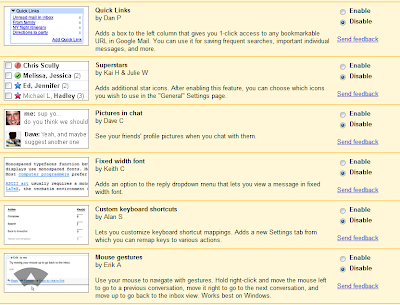
Sometimes I wonder, how Interesting things these guys keep doing[as they are not looking at real world business problems sometimes :P and also forgets to close the security loopholes, they must get plenty of free time]. Anyways, coming to the point I just saw this birght red link appearing in the top-left nav bar as shown
Here you can read more about this new feature[eh eh... ]. Basically it adds a new tab in your Gmail Settings page that let's you choose various features that Gmail Team memeber have deveoped[I believe some of them are done using 20% free time they get per week]. I found some of them pretty neat while some of them, are.. well let's say .. not that pretty-neat. But overall it is a nice idea to have your user base to do the beta-testing of upcoming features. Here is a screenshot of the few of the features.


Thursday, May 15, 2008

CRM SDK 4.0.4 is out...

If you are in CRM 4.0 Development, a must get for you is CRM SDK. You can get the latest version from here : http://www.microsoft.com/downloads/details.aspx?FamilyID=82E632A7-FAF9-41E0-8EC1-A2662AAE9DFB&displaylang=en.

Overview

The Microsoft Dynamics CRM 4.0 Software Development Kit (SDK) is for developers, system customizers, and report writers.
It contains all new information about creating plug-ins, working with custom workflow activities, using the new Web services, using new data management features, and much more.

This SDK contains information for developers writing server side code, custom business logic, integration modules, workflow assemblies, and more. It provides an architectural overview of Microsoft Dynamics CRM, the entity model, security model, and Web services. Sample code and walkthroughs guide you through the new features.

The SDK also contains information for developers customizing the Web client or Microsoft Dynamics CRM for Microsoft Office Outlook, including scripting, integration of custom Web pages, sample code, and a detailed user interface style guide.

Look for regular updates to this SDK. Future releases will include the ISV Guide and Report Writers Guide.
[31-05-2008]
PS : An update has been released(4.0.5). You can download it from here : http://www.microsoft.com/downloads/details.aspx?FamilyID=82E632A7-FAF9-41E0-8EC1-A2662AAE9DFB&displaylang=en

Monday, May 12, 2008

ASP.Net Interview Question Links - Part I

As promised earlier, here are some of the interview questions I was used to refer during my early stages when I started hunting for another job i.e. after around 2+ years with ESS. I am not saying these will get you the job for sure but if you have prepared these and related questions you will be atleast make much more sense when you answer any given ASP.Net Interview.

So here it goes[Links are not in specific order] :
- The one that helped winning a specific interview : http://www.techinterviews.com/?p=193\
Points to remember
- cross-check answers with your friends, colleagues and other sources
- Do not forget to refer to the comments other readers might have made, these comments sometimes leads you to the right answer or more set of questions and maybe better interview material
- do not rely answers as they are given
- just make sure that you have got the question right, and come up with an answer in your own language, so when you answer you will sound genuine. Not like the copy cat[Aren't you?]
Discussion on this blog-post is welcome at http://groups.google.com/group/skynet. If you have any specific request you can use comments feature provided.
Happy Job Hunting... :)

Thursday, May 08, 2008

Installing Microsoft Windows XP SP3 Made Easy

I will go step-by-step and will assume you have a clean/Legal XP SP2 Installed. I am very proud as my current installation has not failed in last 1.5+ years. It is not only that XP SP2 is really good in its own ways, there are tricks I've learnt over the years that helps me to keep my OS safe otherwise, my old friends, knows, every 6 months I had to re-install OS no matter which one is taken for example.[Soon you will find a post on that..OS I've installed and my experience with them].
So here it starts, Installing Microsoft Windows XP SP3 Made Easy for everyone... not just for noobs.. :)

  1. Get the stand alone installer to keep the whole game simple. I know it is easy for some people to get SP3 via windows update, I think, from an average Indian's Internet access view point, we better get the stand alone installer.
    Google as well as DUMB search engine on
    Microsoft Download[When I got it, it was ranked 20405 in popularity :P] will not get you this one easily, so here is the direct link.
    http://www.microsoft.com/downloads/details.aspx?FamilyID=5b33b5a8-5e76-401f-be08-1e1555d4f3d4&DisplayLang=en

    Also maybe in future you can just use the file name or other details mentioned here from the download page.

    File Name: WindowsXP-KB936929-SP3-x86-ENU.exe
    Version: 1 1
    Knowledge Base (KB) Articles: KB936929
    Date Published: 5/6/2008
    Language:English
    Download Size: 316.4 MB

  2. While the file is being downloaded, I suggest you start taking backup of your files, in unfortunate event of update failure, you might just love me that I suggested you to take this step.

  3. Once the file is downloaded, I would suggest it to move it to your fastest disk drive - it can be the SATA drive you have or the portable HDD or anything that has more than 2 GB of free space to keep things fast[My installation started at 01.28 AM and ended at 01.45 AM with 512MB RAM on T2050 @ 1.60GHz]

  4. Close all unnecessary programs and services[stopping services can be a serious problem so as of now if you are not a PRO I would suggest to leave them intact].

  5. Remove all the removable drives, not the one on which you have the SP3 ofcourse. I would suggest to use a clean HDD and system i.e. Anti-Virus and Anti-Spyware check should have been performed. Also remove any bootable disks from optical drives.

  6. Disable the all the Network Adapters and switch off the WLAN if it is on. This is not a mandatory step and it is upto you to follow it or not. However DO NOT forget that you might drop all the protection you have in place in the very next step and you will be vulnerable to any kind of attack... any time.

  7. Shut down your Anti-Virus, Anti-Spyware and Firewall. Yes, I am not drunk this is to not to hinder with SP installation and to improve performance.

  8. If you are using a laptop, please make sure you are plugged in and also have enough backup power in case of power loss. The same goes for PC, a decent UPS will do the trick for the PC users though.

  9. Launch WindowsXP-KB936929-SP3-x86-ENU.exe, if you have downloaded the file from Internet, Windows XP, as a protection measure, might ask you 2-3 times to confirm whether you want to run this file or not. Click on yes without any fear, if something is gonna go wrong..anyways.. it will go wrong.. neither me..nor you can do anything about it.. ) so chill...

  10. It will start extracting the files, most probably to the best drive/volume[In terms of performance].

  11. Once the extraction is complete, follow the On-Screen instructions to start the SP Installation.

  12. It is a pretty simple thing to do though, internally it takes backup of the files to the location which you mentioned at the startup and then updates the system files followed by a system reboot.

  13. Yes, you must reboot the system once you have applied the update.

  14. Start your Anti-Virus, Anti-Spyware and Firewall and then re-attach the removable media as well as enable the network adapters.

  15. And hoorrrray....we are done...

  16. If you face any problem during the setup...you know where you have to look forward to right? aahh..common... not to http://metrix.blogspot.com ... go to Microsoft Support..huh..

Its time guyz : Getting ready for Interviews

May... it has all begun, by mid June you will start getting the idea what is next for you, as students will get the results for their final year and already employed people might start looking at other opportunities outside of their current organizations. so isn't it the right time to start something on Interviews and how to crack them?
I am in process to publish Interview material, Important links, Resume formats and more here as well as in my group [http://groups.google.co.in/group/skynet].
I must thank some of Ex-ESS team members as they have helped me a lot to prepare me for interviews. BTW, many times I get carried away for my previous organization[ESS], 'cause there we had an awesome work culture. Something difficult to find in India, and super difficult to find in Gujarat. As a Gujju, I do understand, by nature, Gujjus are many times money-minded, so much that they want their employees to do 'All Work' and they really don't understand the old sayin' "All Work and No Play makes Jack a Dull Boy". Anywayz, coming to the point, such a freedom and brotherhood we enjoyed, that almost every team member helped each other to crack interview.
And many times, ESS team members were used to go for interviews just for fun. And for a good time we never lost any of the team member. There were two sound reasons for it though, 1.Work Environment, 2. Competitive Pay. I will for sure post on ESS in future, but as of now let me stop here.
I am gonna start posting stuff on here as well as in my group, however I would request you guys n gals to actively provide feedback and improve the material I post here including resume formats, general interview questions, company specific interview questions, HR Cracking style, Personality development stuff, Soft Skills development guide, Practical Sessions and more.

Expecting a lot of input from your side...here I stop...:)

Sunday, May 04, 2008

Bad Bad Bad News...Microsoft withdraws its hostile bid

As a shocking news, I got to read this article, Ballmer's e-mail to staff on Yahoo, I was so damn happy when the announcement was made about the hostile bid, I was jumpin... dancin.. rollin.. on floor.. and then.. suddenly...thud.. something hit my face..and that's the e-mail that says... to Y!.. from Steve Ballmer... withdrawing the bid. I feel bad..really bad..the whole world is drowning and I don't see any rescue boat around..aah.. it is so sad...and..yet another thunk..comes and.. I think..hey.. it isn't that bad. It seems good infact. Though I really would have embraced the idea of Microhoo with love and all the warm feelings, however here is another side which other experts have identified about the deal.
In this takeover, one thing I was really afraid of was.. cultural clash, and trust me guys n gals, I've seen what happens when you do this kindda fusion, apart from other issues you have to manage people and their perception. Also many people will feel insecure and might just quit and many of brand loyals will also walk out, uprooting one of the major agenda Microsoft has to get hold of engineering talents of Y!. Also I was wondering, the money involved is so much, Microsoft can take down so many other small and profitable companies[When Wallstreet opens on Monday... what will happen to Y!'s stock? I am worried ..my friends..]. Anywayz, things are different now, for Y! it is must to survive and do something to turn around the scenario they are going through. 'cause if they can't do it, I can see, sooner or later. Microsoft or someone else, will feast on Y! and we all will say... RIP..Amen..:D