Tuesday, October 02, 2007
'Office Live Workspace' Announced
Posted by
Chinmay
at
Tuesday, October 02, 2007
0
comments
Thursday, September 13, 2007
How to prevent a user from launching multiple instances of an application - .Net C# Code
using System;
using System.Windows.Forms ;
using System.Collections.Generic;
namespace
{
{
/// Define the Mutex
/// </summary>
private static System.Threading. Mutex PreviousInstance;
/// <summary>
if (PreviousInstance.WaitOne(0, false)) //Check for Existing Mutex
/// The main entry point for the application.
/// </summary>
[STAThread]
static void Main()
{
Application .EnableVisualStyles();
Application.SetCompatibleTextRenderingDefault(false );
PreviousInstance = new System.Threading.Mutex(true , "NetBuddy");//Create a Mutex
{
Application.EnableVisualStyles(); //Enable XP/Vista Visual Styles
Application.Run(new frmMain()); //Run Main Form
}
else
{
MessageBox .Show("You are trying to launch multiple Instance of NetBuddy." + Environment .NewLine + "This instance will terminate now.", "NetBuddy Warning", MessageBoxButtons.OK, MessageBoxIcon.Error);//Warn User that another instance is running
}
}
}
Posted by
Chinmay
at
Thursday, September 13, 2007
0
comments
Labels: .Net
Friday, September 07, 2007
GWT - Google Web Toolkit comes out of Beta
From: Chinmay Patel
Subject: Introducing GWT - Google Web Toolkit
To: Team ESS
As we all know and believe, AJAX has the power to make our Web Apps more dynamic and more user friendly and more likely to Win Apps. However AJAX development is often complicated, with much of the development time spent working around browser quirks (Well... we target the great IE so we've an advantage over here) and the fragility of AJAX components(MSXML, Scripting and the CodeBehind in our case). Trust me, I know the development of our own AJAX apps caused us no small amount of AJAX-induced frustration.
As they say on official GWT Page:
Google Web Toolkit (GWT) is a Java software development framework that makes writing AJAX applications like Google Maps and Gmail easy for developers who don't speak browser quirks as a second language. Writing dynamic web applications today is a tedious and error-prone process; you spend 90% of your time working around subtle incompatibilities between web browsers and platforms, and JavaScript's lack of modularity makes sharing, testing, and reusing AJAX components difficult and fragile.
GWT lets you avoid many of these headaches while offering your users the same dynamic, standards-compliant experience. You write your front end in the Java programming language, and the GWT compiler converts your Java classes to browser-compliant JavaScript and HTML.
--
Thanks,
Chinmay Patel
Free thyself from the past, free thyself from the future, free thyself from the present. Crossing to the farther shore of existence, with mind released everywhere, no more shalt thou come to birth and decay.
------------------
Posted by
Chinmay
at
Friday, September 07, 2007
0
comments
Labels: .Net
Wednesday, September 05, 2007
Yahoo! punches back to the spammers
Posted by
Chinmay
at
Wednesday, September 05, 2007
0
comments
Labels: Yahoo
A bug in Gmail
Posted by
Chinmay
at
Wednesday, September 05, 2007
0
comments
Thursday, August 23, 2007
Microsoft launches Tafiti
A brand new concept based on Microsoft Technologies(Live Search and Silverlight) http://www.tafiti.com has been launched. Though it is similar to a mashup, GUI is amazing and search is also pretty quick. Please wait while we get more info on this.
Tafiti, which means "do research" in Swahili, is an experimental search front-end from Microsoft, designed to help people use the Web for research projects that span multiple search queries and sessions by helping visualize, store, and share research results. Tafiti uses both Microsoft Silverlight and Live Search to explore the intersection of richer experiences on the Web and the increasing specialization of search.
Posted by
Chinmay
at
Thursday, August 23, 2007
0
comments
Labels: Microsoft
Wednesday, August 08, 2007
Check out new Y! Messenger built on nextgen Windows Presentation Foundation
Posted by
Chinmay
at
Wednesday, August 08, 2007
0
comments
Labels: Yahoo
Friday, August 03, 2007
Boot.INI Options A to Z
Note: to see what options your system has booted with examine HKLM/System/CurrentControlSet/Control/SystemStartOptions.
/3GB
Increases the size of the user process address space from 2 GB to 3 GB (and therefore reduces the size of system space from 2 GB to 1 GB). Giving virtual-memory- intensive applications such as database servers a larger address space can improve their performance. For an application to take advantage of this feature, however, two additional conditions must be met: the system must be running Windows XP, Windows Server 2003, Windows NT 4 Enterprise Edition, Windows 2000 Advanced Server or Datacenter Server and the application .exe must be flagged as a 3-GB-aware application. Applies to 32-bit systems only.
/BASEVIDEO
Causes Windows to use the standard VGA display driver for GUI-mode operations.
/BAUDRATE=
Enables kernel-mode debugging and specifies an override for the default baud rate (19200) at which a remote kernel debugger host will connect. Example: /BAUDRATE=115200.
/BOOTLOG
Causes Windows to write a log of the boot to the file %SystemRoot%Ntbtlog.txt.
/BOOTLOGO
Use this switch to have Windows XP or Windows Server 2003 display an installable splash screen instead of the standard splash screen. First, create a 16-color (any 16 colors) 640x480 bitmap and save it in the Windows directory with the name Boot.bmp. Then add "/bootlogo /noguiboot" to the boot.ini selection.
/BREAK
Causes the hardware abstraction layer (HAL) to stop at a breakpoint at HAL initialization. The first thing the Windows kernel does when it initializes is to initialize the HAL, so this breakpoint is the earliest one possible. The HAL will wait indefinitely at the breakpoint until a kernel-debugger connection is made. If the switch is used without the /DEBUG switch, the system will Blue Screen with a STOP code of 0x00000078 (PHASE0_ EXCEPTION).
/BURNMEMORY=
Specifies an amount of memory Windows can't use (similar to the /MAXMEM switch). The value is specified in megabytes. Example: /BURNMEMORY=128 would indicate that Windows can't use 128 MB of the total physical memory on the machine.
/CHANNEL=
Used on conjunction with /DEBUGPORT=1394 to specify the IEEE 1394 channel through which kernel debugging communications will flow. This can be any number between 0 and 62 and defaults to 0 if not set.
/CLKLVL
Causes the standard x86 multiprocessor HAL (Halmps.dll) to configure itself for a level-sensitive system clock rather then an edge-triggered clock. Level-sensitive and edge-triggered are terms used to describe hardware interrupt types.
/CMDCONS
Passed when booting with into the Recovery Console.
/CRASHDEBUG
Causes the kernel debugger to be loaded when the system boots, but to remain inactive unless a crash occurs. This allows the serial port that the kernel debugger would use to be available for use by the system until the system crashes (vs. /DEBUG, which causes the kernel debugger to use the serial port for the life of the system session).
/DEBUG
Enables kernel-mode debugging.
/DEBUGPORT=
Enables kernel-mode debugging and specifies an override for the default serial (usually COM2 on systems with at least two serial ports) to which a remote kernel-debugger host is connected. Windows XP and Windows Server 2003 also support debugging through accept IEEE 1394 ports. Examples: /DEBUGPORT=COM2, /DEBUGPORT=1394.
/EXECUTE
This option disables no-execute protection. See the /NOEXECUTE switch for more information.
/FASTDETECT
Default boot option for Windows. Replaces the Windows NT 4 switch /NOSERIALMICE. The reason the qualifier exists (vs. just having NTDETECT perform this operation by default) is so that NTDETECT can support booting Windows NT 4. Windows Plug and Play device drivers perform detection of parallel and serial devices, but Windows NT 4 expects NTDETECT to perform the detection. Thus, specifying /FASTDETECT causes NTDETECT to skip parallel and serial device enumeration (actions that are not required when booting Windows), whereas omitting the switch causes NTDETECT to perform this enumeration (which is required for booting Windows NT 4).
/INTAFFINITY
Directs the standard x86 multiprocessor HAL (Halmps.dll) to set interrupt affinities such that only the highest numbered processor will receive interrupts. Without the switch, the HAL defaults to its normal behavior of letting all processors receive interrupts.
/KERNEL=
/HAL=
Enable you to override Ntldr's default filename for the kernel image (Ntoskrnl.exe) and/or the HAL (Hal.dll). These options are useful for alternating between a checked kernel environment and a free (retail) kernel environment or even to manually select a different HAL. If you want to boot a checked environment that consists solely of the checked kernel and HAL, which is typically all that is needed to test drivers, follow these steps on a system installed with the free build:
Copy the checked versions of the kernel images from the checked build CD to your WindowsSystem32 directory, giving the images different names than the default. For example, if you're on a uniprocessor, copy Ntoskrnl.exe to Ntoschk.exe and Ntkrnlpa.exe to Ntoschkpa.exe. If you're on a multiprocessor, copy Ntkrnlmp.exe to Ntoschk.exe and Ntkrpamp.exe to Ntoschkpa.exe. The kernel filename must be an 8.3-style short name.
Copy the checked version of the appropriate HAL needed for your system from I386Driver.cab on the checked build CD to your WindowsSystem32 directory, naming it Halchk.dll. To determine which HAL to copy, open WindowsRepairSetup.log and search for Hal.dll; you'll find a line like WINDOWSsystem32 hal.dll="halacpi.dll","1d8a1". The name immediately to the right of the equals sign is the name of the HAL you should copy. The HAL filename must be an 8.3-style short name.
Make a copy of the default line in the system's Boot.ini file.
In the string description of the boot selection, add something that indicates that the new selection will be for a checked build environment (for example, "Windows XP Professional Checked").
Add the following to the end of the new selection's line: /KERNEL= NTOSCHK.EXE /HAL= HALCHK.DLL
Now when the selection menu appears during the boot process you can select the new entry to boot a checked environment or select the entry you were using to boot the free build.
/LASTKNOWNGOOD
Causes the system to boot as if the LastKnownGood boot option was selected.
/MAXMEM=
Limits Windows to ignore (not use) physical memory beyond the amount indicated. The number is interpreted in megabytes. Example: /MAXMEM=32 would limit the system to using the first 32 MB of physical memory even if more were present.
For the standard x86 multiprocessor HAL (Halmps.dll), forces cluster-mode Advanced Programmable Interrupt Controller (APIC) addressing (not supported on systems with an 82489DX external APIC interrupt controller).
/MININT
This option is used by Windows PE (Preinstallation Environment) and causes the Configuration Manager to load the Registry SYSTEM hive as a volatile hive such that changes made to it in memory are not saved back to the hive image.
/NODEBUG
Prevents kernel-mode debugging from being initialized. Overrides the specification of any of the three debug-related switches, /DEBUG, /DEBUGPORT, and /BAUDRATE.
/NOEXECUTE
This option is only available on 32-bit versions of Windows when running on processors supporting no-execute protection. It enables no-execute protection (also known as Data Execution Protection - DEP), which results in the Memory Manager marking pages containing data as no-execute so that they cannot be executed as code. This can be useful for preventing malicious code from exploiting buffer overflow bugs with unexpected program input in order to execute arbitrary code. No-execute protection is always enabled on 64-bit versions of Windows on processors that support no-execute protection. There are several options you can specify with this switch:
/NOEXECUTE=OPTIN Enables DEP for core system images and those specified in the DEP configuration dialog.
/NOEXECUTE=OPTOUT Enables DEP for all images except those specified in the DEP configuration dialog.
/NOEXECUTE=ALWAYSON Enables DEP on all images.
/NOEXECUTE=ALWAYSOFF Disables DEP.
/NOGUIBOOT
Instructs Windows not to initialize the VGA video driver responsible for presenting bitmapped graphics during the boot process. The driver is used to display boot progress information, so disabling it will disable the ability of Windows to show this information.
/NOLOWMEM
Requires that the /PAE switch be present and that the system have more than 4 GB of physical memory. If these conditions are met, the PAE-enabled version of the Windows kernel, Ntkrnlpa.exe , won't use the first 4 GB of physical memory. Instead, it will load all applications and device drivers, and allocate all memory pools, from above that boundary. This switch is useful only to test device driver compatibility with large memory systems.
/NOPAE
Forces Ntldr to load the non-Physical Address Extension (PAE) version of the Windows kernel, even if the system is detected as supporting x86 PAEs and has more than 4 GB of physical memory.
/NOSERIALMICE=[COMx COMx,y,z...]
Obsolete Windows NT 4 qualifier—replaced by the absence of the /FASTDETECT switch. Disables serial mouse detection of the specified COM ports. This switch was used if you had a device other than a mouse attached to a serial port during the startup sequence. Using /NOSERIALMICE without specifying a COM port disables serial mouse detection on all COM ports. See Microsoft Knowledge Base article Q131976 for more information.
/NUMPROC=
Specifies the number of CPUs that can be used on a multiprocessor system. Example: /NUMPROC=2 on a four-way system will prevent Windows from using two of the four processors.
/ONECPU
Causes Windows to use only one CPU on a multiprocessor system.
/PAE
Causes Ntldr to load Ntkrnlpa.exe, which is the version of the x86 kernel that is able to take advantage of x86 PAEs. The PAE version of the kernel presents 64-bit physical addresses to device drivers, so this switch is helpful for testing device driver support for large memory systems.
/PCILOCK
Stops Windows from dynamically assigning IO/IRQ resources to PCI devices and leaves the devices configured by the BIOS. See Microsoft Knowledge Base article Q148501 for more information.
/RDPATH=
Specifies the path to a System Disk Image (SDI) file, which can be on the network, that the system will use to boot from. Often used in conjunction with the /RDIMAGEOFFSET= flag to indicate to NTLDR where in the file the system image starts.
/REDIRECT
Introduced with Windows XP. Used to cause Windows to enable Emergency Management Services (EMS) that reports boot information and accepts system management commands through a serial port. Specify serial port and baudrate used in conjunction with EMS with redirect= and redirectbaudrate= lines in the [boot loader] section of the Boot.ini file.
/SAFEBOOT:
Specifies options for a safe boot. You should never have to specify this option manually, since Ntldr specifies it for you when you use the F8 menu to perform a safe boot. (A safe boot is a boot in which Windows only loads drivers and services that are specified by name or group under the Minimal or Network registry keys under HKLMSYSTEMCurrentControlSetControlSafeBoot.) Following the colon in the option you must specify one of three additional switches: MINIMAL, NETWORK, or DSREPAIR. The MINIMAL and NETWORK flags correspond to safe boot with no network and safe boot with network support, respectively. The DSREPAIR (Directory Services Repair) switch causes Windows to boot into a mode in which it restores the Active Directory directory service from a backup medium you present. An additional option you can append is (ALTERNATESHELL), which tells Windows to use the program specified by the HKLMSYSTEMCurrentControlSet SafeBootAlternateShell value as the graphical shell rather than to use the default, which is Windows Explorer.
/SCSIORDINAL:
Directs Windows to the SCSI ID of the controller. (Adding a new SCSI device to a system with an on-board SCSI controller can cause the controller's SCSI ID to change.) See Microsoft Knowledge Base article Q103625 for more information.
/SDIBOOT=
Used in Windows XP Embedded systems to have Windows boot from a RAM disk image stored in the specified System Disk Image (SDI) file.
/SOS
Causes Windows to list the device drivers marked to load at boot time and then to display the system version number (including the build number), amount of physical memory, and number of processors.
/TIMERES=
Sets the resolution of the system timer on the standard x86 multiprocessor HAL (Halmps.dll). The argument is a number interpreted in hundreds of nanoseconds, but the rate is set to the closest resolution the HAL supports that isn't larger than the one requested. The HAL supports the following resolutions:
Hundreds of nanoseconds Milliseconds (ms)
9766 0.98
19532 2.00
39063 3.90
78125 7.80
The default resolution is 7.8 ms. The system timer resolution affects the resolution of waitable timers. Example: /TIMERES=21000 would set the timer to a resolution of 2.0 ms.
/USERVA=
This switch is only supported on Windows XP and Windows Server 2003. Like the /3GB switch, this switch gives applications a larger address space. Specify the amount in MB between 2048 and 3072. This switch has the same application requirements as the /3GB switch and requires that the /3GB switch be present. Applies to 32-bit systems only.
/WIN95
Directs Ntldr to boot the Consumer Windows boot sector stored in Bootsect.w40. This switch is pertinent only on a triple-boot system that has MS-DOS, Consumer Windows, and Windows installed. See Microsoft Knowledge Base article Q157992 for more information.
/WIN95DOS
Directs Ntldr to boot the MS-DOS boot sector stored in Bootsect.dos. This switch is pertinent only on a triple-boot system that has MS-DOS, Consumer Windows, and Windows installed. See Microsoft Knowledge Base article Q157992 for more information.
/YEAR=
Instructs the Windows core time function to ignore the year that the computer's real-time clock reports and instead use the one indicated. Thus, the year used in the switch affects every piece of software on the system, including the Windows kernel. Example: /YEAR=2001. (This switch was created to assist in Y2K testing.)
Thanks to Jonas Fischer for pointing out the PCILOCK and NOSERIALMICE switches. Thanks to Rob Green for information on the FASTDETECT switch.
Copyright © 1996-2004 Mark Russinovich from www.sysinternals.com
Posted by
Chinmay
at
Friday, August 03, 2007
0
comments
Labels: Microsoft
Microsoft Popfly
Let's see how MS defines Popfly first...
"Popfly is a tool that provides a fun and easy way to build and share mash-ups, gadgets, Silverlight experiences, and Web pages using pre-built "Blocks" that connect to online services. Popfly consists of Popfly Creator, which is a set of online visual tools for building Web pages and mashups, and Popfly Space, which is an online community of creators where you can host, share, rate, comment and even remix creations from other Popfly users."
Well... It sounds good... and looks good.. the UI rocks... but after looking at Flash UI available in market I think this one is no big deal. Anywayz, we have to give the credit as Silverlight is in early stage of development. We can definitely expect a strong contender for Flash when it reaches to Release candidate.
I spent almost entire day around its UI and I have got some interesting stuff. We'll see them one by one...
UI
As I mentioned UI is really cool and nitch, only question that came to my mind is usability or ease of use. I had hard time figuring out what exactly is going on in here. Anywayz it is still fun to play with it.
Accessbility
Not much I could see here, maybe because I didnt pay attention or maybe it was not being taken care of.
Performance
During the test, it made my IE Cry... and eventually my CPU and RAM Usage. I was really feeling bad about this. As we all know, Flash is always described as light-weight(I am not talking about http://www.neostream.com/), Silverlight application that powers Popfly.com was an overkill for my decently configured laptop. I believe if I was not running it with 2Gigs of RAM. it would have been difficult to use the application.
What More?
As of now, I have not much information to share as it will take more time to get into the application and check out things. But you can definitely expect more in near future... till then... bbye...:)
Posted by
Chinmay
at
Friday, August 03, 2007
0
comments
Labels: Microsoft
Thursday, June 07, 2007
Microsoft SilverLight - Light Up the Web and Adobe Flash Comparison
Silverlight is a cross-browser, cross-platform plug-in for delivering the next generation of Microsoft .NET–based media experiences and rich interactive applications for the Web.
On fine morning of 30th April, I was in St. Pete, Florida when one of my colleague told me that MS has released SilverLight and after looking at its definition I was bit worried, worried for my till-this-date HOT Adobe Flash(formerly known as Macromedia Flash) browser Plugin. Silverlight by its definition gives an entire new meaning to this dimension of Web. In this article we'll see how these two technologies differ from each other.
What I found interesting in Silverlight is
As we all know, Microsoft is proposing .Net at large and is literally taking out competitors due to its robustness, architecture, security, ease of use, support and development features. Silverlight is one more step to this strategy as well as to reach the audience which is rather difficult to reach due to diversity in OSes used. I have recently used a site based on Silverlight ie Microsoft Popfly. As of now it is in Alpha Release and you can only access it once you get an invitation. Go ahead and register your any .Net Passport Id so that when next set of invitations are sent you get one. Now coming back to the topic, I saw following things when I was playing with Popfly.
Posted by
Chinmay
at
Thursday, June 07, 2007
0
comments
Thursday, May 31, 2007
Microsoft launches the new way to interact with the digital world - Microsoft Surface
According to Microsoft
"Microsoft Surface represents a fundamental change in the way we interact with digital content.
With surface, we can actually grab data with our hands, and move information between objects with natural gestures and touch.
Surface features a 30-inch tabletop display whose unique abilities allow for several people to work independently or simltaneously. All without using a mouse or a keyboar."
Check out : http://www.microsoft.com/surface for exciting video clips and other information on surface.
Posted by
Chinmay
at
Thursday, May 31, 2007
0
comments
Labels: Microsoft
Monday, May 14, 2007
The magic of unmaintainable code
Posted by
Chinmay
at
Monday, May 14, 2007
0
comments
Friday, January 19, 2007
Look at this:
10. Watch out for Empty Arrays
Sending empty arrays over Web Services can create issues – some toolkits recognize an empty array as a single null value. If you are sending arrays of objects over a Web Service, always ensure that the array contains valid data.
9. Use Package and Type Name Options when Generating Client Proxies
Many Java based tools have the option of specifying a unique package and type name when generating client proxies (for example, BEA WebLogic uses clientgen parameters to do this). This is essential when you are creating proxies for Web Services that share the same data type.
8. Testing Generated Java Beans for Null
When using tools or an IDE to generate Java Beans from an XSD file, always make sure that you know how to test to see if the object is null. In some instances this is done using the isNil() method on the bean itself.
Posted by
Chinmay
at
Friday, January 19, 2007
0
comments
Labels: .Net
Wednesday, December 20, 2006
A brand new(and efficient) way to implement Paging
Here is a link I bumped into while doing some R&D. As usual, couldn't stop my self... and posted it here. http://weblogs.asp.net/scottgu/archive/2006/01/01/434314.aspx
Posted by
Chinmay
at
Wednesday, December 20, 2006
0
comments
Labels: .Net
A low-level Look at the ASP.NET Architecture
http://www.west-wind.com/presentations/howaspnetworks/howaspnetworks.asp
Discussion on this post is most welcome, infact I hope there are going to be some questions. :)
Posted by
Chinmay
at
Wednesday, December 20, 2006
0
comments
Labels: .Net
Tuesday, December 19, 2006
The begining of the Matrix?
http://news.com.com/2008-1023_3-6144122.html?part=rss&tag=2547-1_3-0-20&subj=news
Posted by
Chinmay
at
Tuesday, December 19, 2006
0
comments
Thursday, December 07, 2006
Online Resources I use...
As you all know, now I've got what I always wanted, I am kindda free now, so I've decided I'll answer most of the queries you guyz had when I was there. As a part of that, here are the online resources I use a lot :
Non-Microsoft Subscriptions I Use
SDTimes.com
Redmondmag.com
101Communications.com(For Free Subscriptions)
MCPMag.com
ENTOnline.com
Tcpmag.com
Microsoft Subscriptions I Use
MS Architecure Journal - Hard Copy as well as Soft Copy:D
MSDN Flash India and International
MCP Flash
Microsfot Security bulletin and Notifications
TechNet Flash
Mobile PC
Sites I Use
TechTree.com
Experts-Exchange.com
CodeProject.com
bytemycode.com
PCQuest.com
msdn.microsoft.com
geekinterview.com
google.com
Posted by
Chinmay
at
Thursday, December 07, 2006
0
comments
Labels: Microsoft
Tuesday, November 28, 2006
Hosting JSP, PHP or any other Server Side Architecture(CGI) on IIS
On IIS.Net FastCGI was described as:
The IIS FastCGI component enables popular application frameworks like PHP be hosted on the IIS web server in a high-performance and reliable way.
FastCGI provides a high-performance alternative to the Common Gateway Interface (CGI), a standard way of interfacing external applications with Web servers that has been supported as part of the IIS feature-set since the very first release.
CGI programs are executable launched by the web server for each request in order to process the request and generate dynamic responses that are sent back to the client. Because many of these frameworks do not support multi-threaded execution, CGI enables them to execute reliably on IIS by executing exactly one request per process. Unfortunately, it provides poor performance due to the high cost of starting and shutting down a process for each request.
Posted by
Chinmay
at
Tuesday, November 28, 2006
0
comments
Monday, November 06, 2006
Windows File System : Archive Bit
Recently I got a a mail clearly asking information regarding Archive Bit that is available on FAT32, NTFS and its implications from Developer's perspective. So here is an article that will try to throw some light on this topic.
According to PCMAG : A file classification that indicates whether the file has been updated since the last backup. A bit is set in the file directory to indicate the archive status. When a file is created or saved, the bit is turned on. When it is backed up, the bit is turned off.
and technically its a file attribute controlled by the high-order bit of the t3 byte (FCB + 11) in a directory element. This attribute is set if the file has been archived.
Here is a VBScript code sample that shows how to access File Attributes.
http://sallisawok.org/caspdoc/html/vbscript_file_object_attributes_property.htm
Posted by
Chinmay
at
Monday, November 06, 2006
0
comments
Friday, October 06, 2006
Google launches Google Code Search
Google has launched yet another Developer friendly service yesterday ie Google CodeSearch(http://www.google.com/codesearch).
It's a search engine developed for developers and it provides an interface to use RegEx to search code snippets they are looking for. I didn't try it much as now I am headed to some other things... I felt it will be extremely useful to you people.
Google Code Search helps you find function definitions and sample code by giving you one place to search publicly accessible source code hosted on the Internet. With Google Code Search, you can:
- Use regular expressions to search more precisely
- Restrict your search by language, license or filename
- View the source file with links back to the entire package and the webpage where it came from
Posted by
Chinmay
at
Friday, October 06, 2006
0
comments
Tuesday, September 12, 2006
Visual Studio 2020
I was looking at the newsletter from CodeProject and got my eyes on this kewl article. Have a look at this tiny (aaaargh) article.
Posted by
Chinmay
at
Tuesday, September 12, 2006
0
comments
Wednesday, August 09, 2006
I became MCP
Hey hey.... it's been a long long time... I agree... yes.... its been a long time... had gone through many things in last 6 months, got VNS Series of projects, took part in MS Security Shootout 2006(http://www.securityshootout.com) also decided what I will be doing next few years...of course its Software Development but now I can see it, define it and then it comes to my mind that going on that path I'll need something on my side, some credential/certification and what in this world is better than MS Certifications if you are a .Net Developer? So today was a big day, I went to Crystal Arcade at CG Road, Ahmedabad and I got my first MS Certification i.e. Microsoft .NET Framework 2.0 - Application Development Foundation C# (70-536). The exam was tough but the MSDN2, Virtual Labs and Visual Studio Express/Beta editions I used was sufficient enough to crack it. And I got it done, it took time, but it was done. And now I am heading towards the Final Destination for a Developer lets see how does it rolls out....
Posted by
Chinmay
at
Wednesday, August 09, 2006
0
comments
Monday, January 30, 2006
How to display an assembly in the Add Reference dialog box
Many of my friends recently asked me about GAC and the Side by Side Versioning support .Net provides. After doing a lot of R&D, one of them came up with a question like this : How to use two different versions of an assembly by using a GAC. He knew how to add Assemblies to GAC so that was not at all a problem, infact, if you refer to HOW TO: Install an Assembly into the Global Assembly Cache in Visual Studio .NET its pretty simple. However, after you add it to GAC, the .Net IDE doesnt show you those assemblies, listed in Add Reference Dialog Box.
After searching MS KB, I got an easy way to do that, here it follows :
Open Registry Editor and add the following Key to it.
[HKEY_LOCAL_MACHINE\SOFTWARE\Microsoft\.NETFramework\AssemblyFolders\ESSAssemblies]@="C:\\ESSAssemblies"
Here, ESSAssemblies is the name of the Folder where your Assemblies reside.
Posted by
Chinmay
at
Monday, January 30, 2006
0
comments
Sunday, December 25, 2005
Yes, Virginia, There is a Santa Claus
The People’s Almanac, pp. 1358–9. (Originally published in The New York Sun in 1897.)
We take pleasure in answering thus prominently the communication below, expressing at the same time our great gratification that its faithful author is numbered among the friends of The Sun:
Dear Editor—
I am 8 years old. Some of my little friends say there is no Santa Claus. Papa says, “If you see it in The Sun, it’s so.” Please tell me the truth, is there a Santa Claus?
Virginia O’Hanlon
Virginia, your little friends are wrong. They have been affected by the skepticism of a skeptical age. They do not believe except they see. They think that nothing can be which is not comprehensible by their little minds. All minds, Virginia, whether they be men’s or children’s, are little. In this great universe of ours, man is a mere insect, an ant, in his intellect as compared with the boundless world about him, as measured by the intelligence capable of grasping the whole of truth and knowledge.
Yes, Virginia, there is a Santa Claus. He exists as certainly as love and generosity and devotion exist, and you know that they abound and give to your life its highest beauty and joy. Alas! how dreary would be the world if there were no Santa Claus! It would be as dreary as if there were no Virginias. There would be no childlike faith then, no poetry, no romance to make tolerable this existence. We should have no enjoyment, except in sense and sight. The external light with which childhood fills the world would be extinguished.
Not believe in Santa Claus! You might as well not believe in fairies. You might get your papa to hire men to watch in all the chimneys on Christmas eve to catch Santa Claus, but even if you did not see Santa Claus coming down, what would that prove? Nobody sees Santa Claus, but that is no sign that there is no Santa Claus. The most real things in the world are those that neither children nor men can see. Did you ever see fairies dancing on the lawn? Of course not, but that’s no proof that they are not there. Nobody can conceive or imagine all the wonders there are unseen and unseeable in the world.
You tear apart the baby’s rattle and see what makes the noise inside, but there is a veil covering the unseen world which not the strongest man, nor even the united strength of all the strongest men that ever lived could tear apart. Only faith, poetry, love, romance, can push aside that curtain and view and picture the supernal beauty and glory beyond. Is it all real? Ah, Virginia, in all this world there is nothing else real and abiding.
No Santa Claus! Thank God! he lives and lives forever. A thousand years from now, Virginia, may 10 times 10,000 years from now, he will continue to make glad the heart of childhood.
http://beebo.org/smackerels/yes-virginia.html
Posted by
Chinmay
at
Sunday, December 25, 2005
0
comments
Monday, December 19, 2005
I got a Nokia 6630 :)
Well... Nokia 6630 was on my wish list since it came out... the fastest S60 mobile in market.
It looks real sleek n sexy...and is packed with tones of features that any techie would love to have....
Dimensions: 110x60x21mm — that's considerably smaller than the 3650. It'll fit in regular pants with no need for funny smiles from strangers. ;)
CPU: 220mhz ARM9 / RAM: 7MB free — that's more than twice the speed of the 3650 (107mhz) and almost three times the amount of RAM available (2.7MB)! You feel the speed instantly when working with the applications, games or even just opening Message Boxes.
Camera: 1.23 megapixel (1280x960) with 3.7mm lens — this takes much, much better pictures than both the 3650 and the 6600 (This is my personal openion) in daylight. Evening shots are still so-so. And there's almost no lag on the shutter. Click and the picture is taken thanks to the faster CPU.
Stereo audio and decent headphones — it's actually possible to enjoy listening to MP3's on the phone now.
3G! — This one is a real 3G phone with Excellent Network support and extremely fast download speed as compared to oldies.
Posted by
Chinmay
at
Monday, December 19, 2005
0
comments
Tuesday, December 13, 2005
The DoomsDay Launch
I was more than happy when we were about to launch a Project, we'll call it Project X, everything was fine, it's very well tested in Testing environment, but we never know when things can go wrong. At the day of launching we deployed that Project X to the Servers and it broke within matter of seconds. Well! we stayed till late night and we fixed it and came home, however, what I saw at that time was : Lack Of Communication between counterparts of the organization. The actual story that came out was we were configuring a test setup instead of the real one, so whatever changes we made were done on test setup only 'cause we were not informed that it was a test setup. When an enterpise grows, people have to learn effective communication methods that keeps everyone involved on a same page. I am not saying that we were not wrong, no we were not informed. Without adequate information it'll be difficult for anyone to go ahead and deploy projects like this. but afterall we learned new things, things that will help us in future when we deploy projects. Moral of the story is : When you are gonna do something, DOCUMENT it, inform concerned people about the things you are going to do. DO NOT make Assumptions or it'll come back to you.
Posted by
Chinmay
at
Tuesday, December 13, 2005
0
comments
Thursday, December 01, 2005
Yesterday, I came across a real world RIA... naah... not a girl... but a Rich Internet Application called goowy it was a featured site on my favourite macromedia.com so I visited it .. and i was stunned by what I saw at goowy.com.
What They say :
goowy (re) is a rich experience service that offers you a new way of expressing yourself and interacting with your friends and family. We leverage the best web technologies to provide you with a fun, unique environment for managing your web mail, contacts, calendar, widgets, games and more.
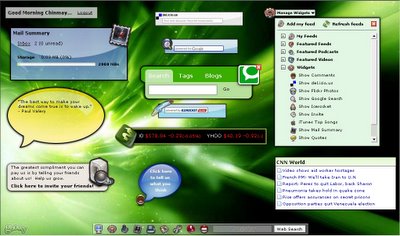
What I would say...? Well...its a Web Based Desktop Solution, yes No Kidding... a Web based Desktop Solution (see below) its 100% Customizable as if its my Windows Desktop.... infact you can change your desktop theme too...

You can add necessary Widgets as per your requirements by using Manage Widgets Extension and for those, who loves to have the power of Windows Based Desktop, goowy comes as a Window based solution, a separate download is available for Windows and a Mac version is coming soon.
It gives you a 2 GB Mail Box, a RICH UI to explore, Calender, Contacts and Games :) I found its mailbox a real magic, notifiers, quick search and everything accessible at just one click.You can import your contacts from Outlook and alike mail clients.
Lets look at Mail Box first.
Its lil bit heavy for dial up users at first I suggest to use Lite version, and all those who are blessed with so-called Broad band, Goowy grooves... rocks... and wateverz..... its a 2 GB Mailbox with a nice Layout. Apart from traditional Mailbox features this one Comes packed with Audio-Visual notifiers for new mails, Manageable Folders, and a Fast Search Engine built into the mailbox itself.
Widgets allows you to customize your desktop by adding popular web services like Search Engines, Quotes, Stocks, News etc
Contacts Its a comprehensive contact manager, I would like to add I find it better than the one that comes with GMail. Its like the one that you see with Outlook. It has a useful feature : Import Contacts and for me it worked like a charm I added all of my GMail contacts to it by just clicking in the Wizard.
Games
Hiyaa... I wont say about Games here.... ;)
Calender Its well-structured and works fine, but I am not that good with scheduling my tasks so I didn't explore it much.
Goowy is not a Big Budget Adventure, it was started as a PoC, and now it has 25K registered users. Its a development effort, I request all of the developers out there or who ever reads this mail to register with goowy not just to maintain another mail box but to support the efforts.
Regards,
Chinmay
Posted by
Chinmay
at
Thursday, December 01, 2005
0
comments
Monday, September 19, 2005
Kewl.... MS Office 12 Screen Shots - PDC 2005

Access

Excel

Word
Posted by
Chinmay
at
Monday, September 19, 2005
0
comments
Labels: Microsoft
Thursday, July 28, 2005
I am goin for MCA :)
Hi All,
Today, I got ready early in the morning, it was raining out there, sometimes I wonder, is there something I've to do with monsoon? it drives me crazy when I see its raining... anywayz! I reached RCC at 1, and than I waited till 3 to get in to the process, it was funny, but I forgot to
carry a pen... so had to borrow all the times I needed to fill/sign the form. but at last I got it.
I was lookin towards LD...and yeah... I got it... Now I'll be doin my MCA from LD.
well! thats enough for today... see ya tomorrow...
Posted by
Chinmay
at
Thursday, July 28, 2005
0
comments
Tuesday, July 05, 2005
A good Article on AJAX
Hi Guyz,
Here follows an article that will change your world of web application.
How you code them, how you use them, how you persive them... Everything
that you have seen so far in Web Applications is gonna go nuts once you
see this. This is something that will help us to go beyond the
Edge(That's ESS Style...) of Web Apps... so here we go... say welcome
to the NextGen technology - AJAX
Regards,
Chinmay
Posted by
Chinmay
at
Tuesday, July 05, 2005
0
comments
Monday, July 04, 2005
I m back! :)
Hi Guyz!
I m back after such a long period..... I got some time to take a breath... huh... man! I m telling you... those were days... toooo busy....I cant beleive that I can
work so hard ;)
btw, I'll be posting some cool pics and clips which I recently took during this
rainy season
Posted by
Chinmay
at
Monday, July 04, 2005
0
comments
Saturday, April 30, 2005
ASP.Net - Trace Viewer
ASP.NET introduces new functionality that allows you to view diagnostic information about a single request for an ASP.NET page simply by enabling it for your page or application. Called tracing, this feature also allows you to write debug statements directly in your code without having to remove them from your application when it is deployed to production servers. You can write variables or structures in a page, assert whether a condition is met, or simply trace through the execution path of your page or application.
One interesting feature comes built in with .Net Framework is : Trace Viewer.
To Test this functinoality you have to enable tracing in your application. Change <Trace>
<trace enabled="true" requestLimit="10" pageOutput="false" traceMode="SortByTime" localOnly="true" />
Once you have enabled tracing for your application, each page in the application will execute any trace statements that it contains when it is requested. You can view these statements and the additional trace information in the trace viewer by requesting Trace.axd from the root of your application directory.
Note When you enable tracing for an application, you can view the trace statements, and additional information, in any page in the application by setting the pageOutput attribute to true in the Web.config file.The trace viewer allows you to choose a specific request from the pages that have been requested from your application.
Well, if you are still using Classic ASP, than here is a similar utility for you. Click Here download.
Posted by
Chinmay
at
Saturday, April 30, 2005
0
comments
Labels: .Net
Wednesday, April 27, 2005
Norton Ghost 2003 Quick Walkthrough
So Friendz, here is a Quick Walkthrough to create an Image using Norton Ghost 2003...(This one was requested by my friend.... DJ)
1. Click on Backup
2. Select Physical Disk
3. Select Partition, you can use CTRL to select Multiple Partitions
4. Select Destination - File
5. Browse to the location where you want to save the Image, you can't store it on the same partition of which you are making Ghost Image.
6. Now, you can configure Advanced Settings(They are beyong the scope of this walkthrough)
7. Now it will show you task summary. click on Run Now.
8. it will reboot your computer and then you'll be provided option to perform Ghost Image Operation or cancel it.
9. if you select to perform Ghost Image operation, it'll create a ghost Image of selected partition/s.
Posted by
Chinmay
at
Wednesday, April 27, 2005
1 comments